
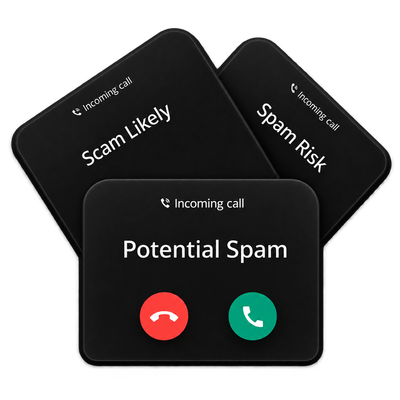
You’re trying to reach your customers, and instead your calls are getting ignored or blocked because they are being labeled as Spam.... you’re not alone.
This is an industry-wide battle many businesses are experiencing. We're here to help you navigate through the steps to tackle this issue.
Why This Happens
Carriers have teamed up with third-party analytics companies to handle call labeling and help protect consumers from unwanted spam and fraudulent calls. That's a good thing, right? As consumers, we certainly appreciate when our carriers help block spam calls.
As a business, though, it can be incredibly frustrating when those protections are too aggressive and legitimate calls get caught in the mix.
As carriers and analytics providers continue strengthening their spam prevention efforts, valid business calls can sometimes be mislabeled or blocked along with the bad traffic. If you're reading this article, there's a good chance this is happening to your business. The good news is there are steps you can take to address it.
What Call Labeling Looks Like
The call label consumers see on their phone can vary depending on the carrier being called and the analytics provider they use.
For example, a call may appear as:
- Potential Spam when calling a Verizon customer
- Scam Likely when calling a T-Mobile customer
- Spam Risk or Fraud Risk when calling an AT&T customer
Other carriers and providers may use labels such as Robocaller, Fraudulent Call, or similar warnings.
Tip: Make note of the exact label being displayed and the carrier receiving the call. You'll use this information later to identify where to report the issue.
Steps to Clear Spam Label
There isn't a single magic fix, but these four steps are the best place to start.
These foundational actions can help improve the issue now and protect your call reputation long term.

Register Your Numbers (Important)
Registering through Free Caller Registry updates multiple major analytics providers and associate's the numbers with your business to help establish that your calls are legitimate.

Report to Providers Directly
Use the Call Label Reporting Guide below to report the issue directly to the providers that manage the label.

Configure Calling Name Value (CNAM)
Make sure your Calling Name is accurate and recognizable.

Follow Best Practices
See Calling Best Practices below for full details.
How to Report Mislabeled Calls
Locate the call label your customers are seeing in the chart below. Then use the links under “Where to Report” to raise the issue directly to the carrier and analytics provider associated with that label.
Please note: Analytics providers require the business using the number to submit the report directly, and discourage carriers from submitting reports on their behalf.
| Where to Report | ||
|---|---|---|
| Call Label | Carrier | Analytics |
| Potential Spam | C-Spire | |
| Verizon | TNS | |
| US Cellular | ||
| Scam Likely | T-Mobile | First Orion |
| Spam Likely | Spectrum | TNS |
| Spam Risk / Fraud Risk | AT&T | Hiya |
| Fraudulent Call | Altice Fidelity Telzio Windstream |
|
| Robocaller | Frontier | |
| Lumen | Nomorobo | |
| Blocked - High Spam Risk | Comcast (Xfinity) | TNS |
| Spam? / Robo? | Altice | |
| Spam? | Comcast (Xfinity) | TNS |
| Fidelity | ||
| Windstream | ||
| Spam | Truecaller |
Not sure which provider to engage? We can help identify the correct carrier. Please email support@voyant.com for assistance.
What if the Issue Persists After Working with the Provider?
If you’ve reported the issue to the carrier and analytics provider and your calls are still being mislabeled, let our team know by emailing support@voyant.com.
The final labeling decision belongs to the carrier and its analytics partners, so Voyant cannot directly remove a spam label. But we can help review your specific situation, confirm next steps, and explore any available escalation options.
Additional Resources
Calling Best Practices
What Can Accidentally Make It Worse
- Avoid rotating or cycling through different numbers as it can reduce trust and reputation.
- New numbers have little or no reputation and may be more likely to be flagged.
- Avoid repeatedly testing new numbers, especially at very low call volumes
Day-to-Day Calling Practices
- Maintain consistent, natural calling patterns.
- Spread outbound calls over time to avoid patterns similar to automated calls.
- Limit repeated calls to the same number within a short period.
- Avoid sudden spikes in call volume or large numbers of very short calls.
- Watch answer and rejection rates.
- Low answer rates or frequent declines can negatively affect call reputation.
Build Trust with Consistent, Legitimate Traffic
- Ensure strong customer validation (KYC) and confirm all traffic is legitimate.
- Use consistent outbound numbers so they can build reputation over time.